Typing “make me a 12-week training plan” into ChatGPT will get you something back. It might look plausible. It might even be vaguely appropriate for someone. But it probably won’t be appropriate for you: your fitness level, your injury history, your schedule, your goal race. The output is only as good as what you put in, and most people put in almost nothing. Used properly, AI can function like a real coach, building a structured plan, adapting it week to week based on your feedback, and calling you out when you go harder than you should. This post walks you through exactly how to get a useful AI training plan the right way.
TL;DR
Set up a dedicated project in your AI tool of choice, then feed it detailed, accurate data about your current fitness, your schedule, and any injuries. Treat it as an ongoing conversation, not a one-shot request. Provide session feedback after each workout so it can adapt. The quality of the plan depends entirely on the quality of your inputs.
Key Takeaways
- Start with a dedicated project so the AI always has full context
- Generic prompts produce generic plans. Specificity is everything.
- The data you feed it upfront determines how useful the output is
- Post-session feedback is what separates a static plan from an adaptive one
- AI can push back and hold you accountable, but only if you are honest with it
- It has real limitations: it cannot feel your legs, and it cannot stop you from ignoring it
Why Most AI Training Plans Are Useless
It’s not the AI’s fault. It’s the prompt.
I want to be clear about what this post is and isn’t. This isn’t about dedicated AI coaching apps or subscription platforms that build plans for you automatically. This is about using general-purpose AI tools, the kind you probably already pay for, and getting more out of them by knowing how to use them properly.
When someone asks for a training plan without any context, the AI does what any reasonable system would do: it makes assumptions. It assumes average fitness, no injuries, a typical schedule, and a generic goal. The result is something that could work for a fictional average athlete, which is not you.
The fix is simple. Give it real information and it produces something real. That’s the whole premise of this post.
Which AI Tool Should You Use?
ChatGPT, Claude, and Gemini all work. The choice mostly comes down to personal preference. There is no single right answer, and the method is the same regardless of which one you pick.
One thing worth saying clearly: use a paid version. The free tiers are limited in how much context they can handle, and for something like this, where you’re feeding in a lot of data and maintaining an ongoing conversation, that limit matters. You will hit a wall at exactly the wrong moment.
Pick whichever tool you already use and pay for. If you’re starting from scratch, any of the three will do the job.
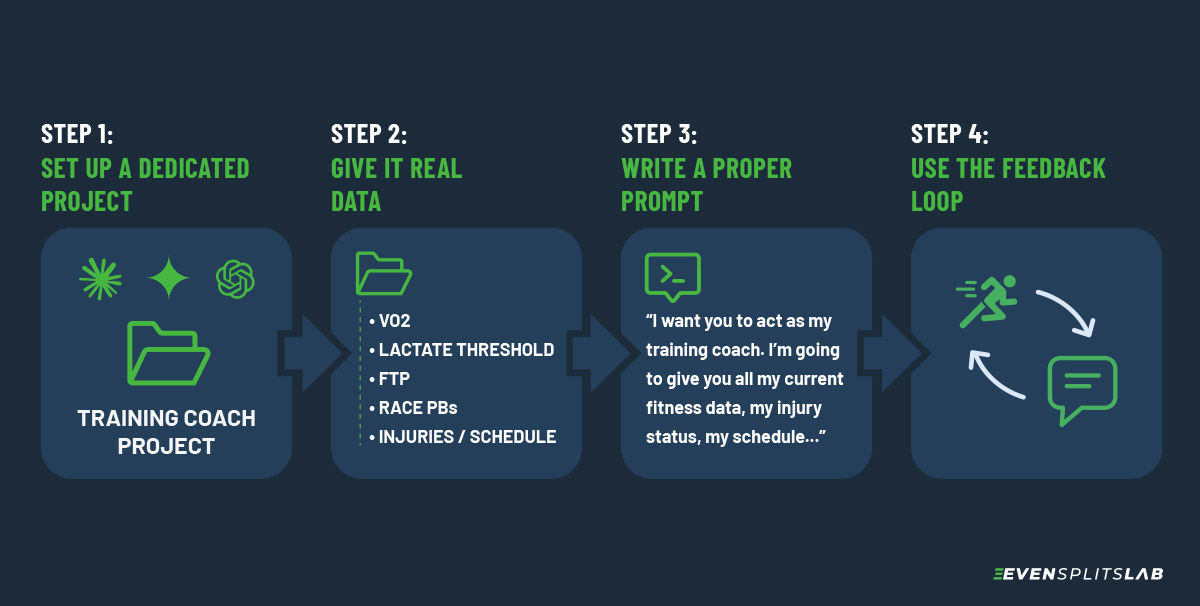
Step 1: Set Up a Dedicated Project
Before anything else, create a dedicated project in whichever AI tool you’re using. Claude and ChatGPT Plus both support this. Not all tools do, and free tiers typically don’t.
The reason this matters: a project keeps your full context in one place. Your fitness data, injury notes, training plan, and every check-in after a session all live in the same conversation thread. The AI always has the full picture when you open it. You never have to re-paste your background data.
Without a project, you’re starting semi-fresh every time you open a new chat. The AI is making decisions without remembering what happened in previous sessions, which defeats the point of the feedback loop entirely.
Set it up once. Use it for the entire training block.
Step 2: Give It Real Data
This is the part most people skip, and it’s the most important part. Before you ask for a plan, give the AI a complete picture of where you’re at. Think of it like a coach intake form.
Here’s what to include:
Current Fitness Markers
- VO2 max (your GPS watch likely has an estimate)
- Lactate threshold pace or heart rate, if you know it
- FTP if you cycle (functional threshold power)
- Recent race times or personal bests across distances
- Current weekly training volume (hours or kilometres)
If you train with a Garmin or similar device, you can pull most of this directly from your app. Even rough numbers are better than nothing.
Understanding your training zones helps the AI prescribe effort levels accurately. If you’re not sure how to read yours, check out: How to Read Your Heart Rate Zones (And Why Most People Get Them Wrong).
Injury History and Current Issues
Be specific. Don’t just say “I have a bad knee.” Describe what it is, when it started, what aggravates it, and what you’re currently doing to manage it.
If you’re managing something active right now, include the severity. A pain scale helps. “2/10 on longer runs, gone by the next morning” gives the AI something concrete to work with.
A good AI will build constraints around your injury rather than ignoring it. It can structure a phased return, flag certain surface types, and prescribe supporting exercises. But only if it knows what it’s working around.
Your Schedule
Tell it which days you can train, for how long, and what equipment or facilities you have access to. If you’re a triathlete, specify which disciplines you’re doing and how many sessions per week.
Also flag any weeks where you know volume will drop: a work trip, a family event, whatever. Better to plan around these upfront than to scramble when they arrive.
Your Goal Race
Date, distance, course profile if you know it, and your target time. If you have a realistic range rather than a single target, give both. “I’d be happy with 1:55, I’m aiming for 1:50” is more useful than just “1:50.”
If you have other races in the season that affect how you want to peak, mention those too.
Step 3: Write a Proper Prompt
Once you have your data together, don’t just paste it in with “make me a plan.” Set the context first.
Tell the AI what role you want it to play and what you need from it. Something like:
“I want you to act as my training coach. I’m going to give you all my current fitness data, my injury status, my schedule, and my race goal. Based on that, I want you to build me a 8-week structured training plan. I’ll give you feedback after each session and I want you to adjust the plan based on that feedback. If I report pain above 2/10 or do something outside what you’ve prescribed, call it out.”
Then paste in all your data.
This framing does two things: it tells the AI how to behave, and it sets an expectation for an ongoing relationship rather than a one-time output.
Step 4: Use the Feedback Loop
This is what makes the difference between a static training document and something that actually adapts to you.
After each session, report back. You can do this two ways. The manual approach: a few lines covering what you did, how it felt, and anything worth flagging. Or, if your watch exports data, upload a screenshot directly from Garmin or similar. Heart rate, pace, cadence, effort — the AI can read it and pull out what it needs. I do this after most runs. It’s faster than typing and the AI picks up on things you might not think to mention.
Either way, keep it focused:
- What you did vs. what was prescribed
- How it felt (RPE, heart rate if relevant)
- Any pain or discomfort: where, when, how much
- Anything unusual: poor sleep, a stressful week, bad conditions
The AI uses this to make decisions about what comes next. If you’re recovering well and sessions feel easy, it might push the load. If you’re flagging fatigue or pain, it should dial back. But it can only do this if you give it accurate information.
One thing worth mentioning for Strava subscribers: as of June 2026, Strava launched an official connector that links your account directly to Claude. Instead of manually exporting data or uploading screenshots, you connect once via OAuth and can ask natural-language questions about your activities, fitness trends, and training load, answered from your live Strava data, not a static export. Heart rate, pace, power, GPS data — it’s all accessible straight from the conversation. For the feedback loop in Step 4, this changes things considerably. Rather than typing out what your session felt like, you can let Claude pull the data itself and ask it to assess how the session compares to what was prescribed. Here’s how to set it up.
Be honest. If you ran harder than prescribed, say so. A good AI will call you on it, which is useful, because sometimes you need something to tell you to slow down.
What This Looks Like in Practice
When I was preparing for the BMO Half Marathon earlier this year, I fed Claude everything: VO2 max, lactate threshold pace, FTP, personal bests, my full weekly training structure across swim, bike, and run, and an active tibialis posterior tendinopathy I was managing at around 1–2/10. The plan it built was phased, starting with tissue reloading, with Phase 2 entry contingent on clean sessions in Phase 1.
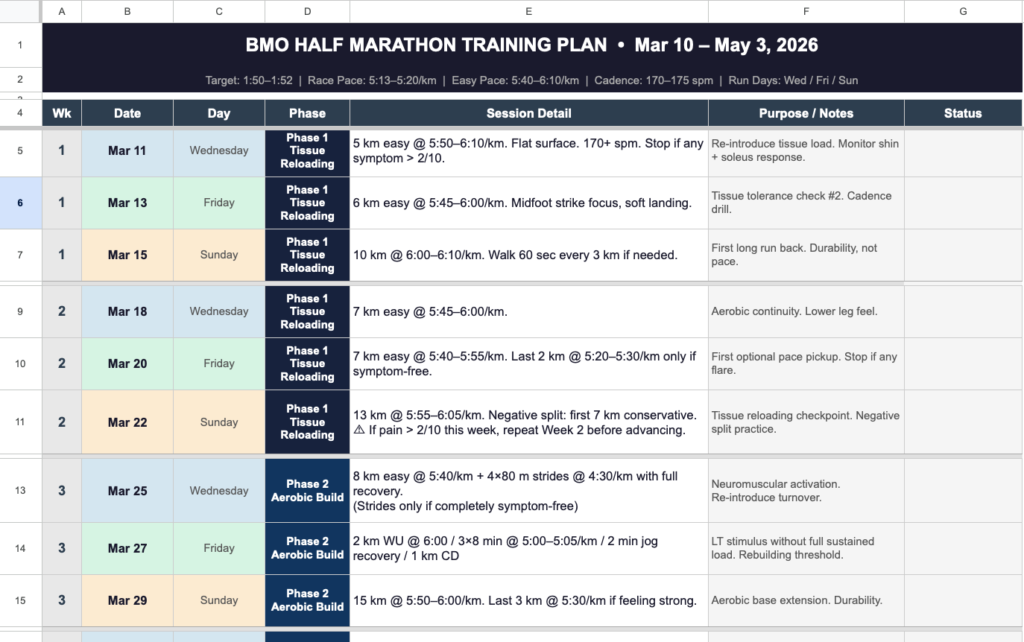
After every run, I reported back. It adjusted surface types, reduced volume on a specific session when pain crept up, and when I pushed beyond what was prescribed one day, it told me directly that I could not do that. Not a suggestion. A clear instruction.
I eventually had to stop when a physio told me to dial back fully. The plan itself didn’t fail. It had been flagging the issue the whole time. That part is on me.
A training partner of mine is currently using the same approach for his Ironman block. More experienced athlete, no active injuries, running the whole thing on AI alone. For his next cycle, he’s planning to import an existing TrainingPeaks plan and use AI to adapt it week to week. Not building from scratch, but using AI as a responsive layer on top of a structured programme. Both approaches work.
What AI Can’t Do
Worth being clear about the gaps, because there are real ones.
- It can’t see you. A coach watching you run can spot a gait issue or a compensation pattern you’re not even aware of. The AI is working entirely from what you tell it.
- It can’t stop you. If you leave things out or aren’t honest with it, it will make bad decisions based on incomplete information. The accountability only works if you hold up your end.
- It’s not a medical professional. For anything involving injury, it should inform your decisions, not replace a physio or sports medicine doctor. It can help you plan around an issue. It cannot diagnose one.
Used within those limits, it’s a genuinely useful tool. Used as a substitute for professional care or honest self-reporting, it will fall short.
FAQ
You can, but it’s not ideal. Free tiers have context limits that become a problem when you’re maintaining a long conversation across weeks of training. You’ll get better results with a paid plan.
After every session is ideal. It doesn’t have to be long. A few lines covering what you did, how it felt, and any pain or fatigue is enough. The more consistent your feedback, the more useful the adaptations.
Use what you have. Recent race times and a rough sense of your weekly volume are a solid starting point. Be upfront with the AI about what you’re estimating. It can work with approximate data as long as it knows that’s what it is.
No. A real coach can observe you, read between the lines, and apply judgment based on things you haven’t told them. AI works from what you give it. For self-coached athletes who want structure and adaptability without the cost of a coaching app or human coach, it’s a solid option, but it’s not the same thing.
Yes, and this is actually a strong use case. Import a structured plan from TrainingPeaks or similar, feed it to the AI alongside your personal data, and use it to adapt week to week. You get the structure of a proven plan with the flexibility of something responsive.
Related Posts
If you’re setting up your AI prompt and want to include accurate training zone data, read: How to Read Your Heart Rate Zones (And Why Most People Get Them Wrong)
For the personal metrics worth including in your prompt, start here: How to Calculate Your Sweat Rate at Home