Picking a first bike computer sounds easy until you open two spec sheets. Both brands promise great navigation, long battery life and easy ride tracking. Neither tells you what happens six months later, when a ride refuses to upload or the screen washes out in the sun. In our house, I ride with a Wahoo and my wife rides with a Garmin, so I get a side-by-side look without spending a cent. Here is my honest take on Wahoo vs Garmin bike computer, from two people who actually use them.
TL;DR: Both brands handle the basics well. The real differences show up in the details a spec sheet skips, like battery habits, what happens when sync misbehaves and how much you get from the app. In our house, each brand wins a different argument.
Key takeaways
- Screen type is a model choice, not a brand choice. Both brands make button-only and touchscreen units.
- Wahoo feels simpler and calmer. Garmin does more, and some of the extras are genuinely useful.
- Both brands gave us sync headaches, so don’t expect either one to be flawless.
- You can mix sensors across brands, but you may lose a few brand-specific tricks.
- Elevation totals vary between devices, so treat them as estimates.
Wahoo vs Garmin bike computer: how I’m comparing them
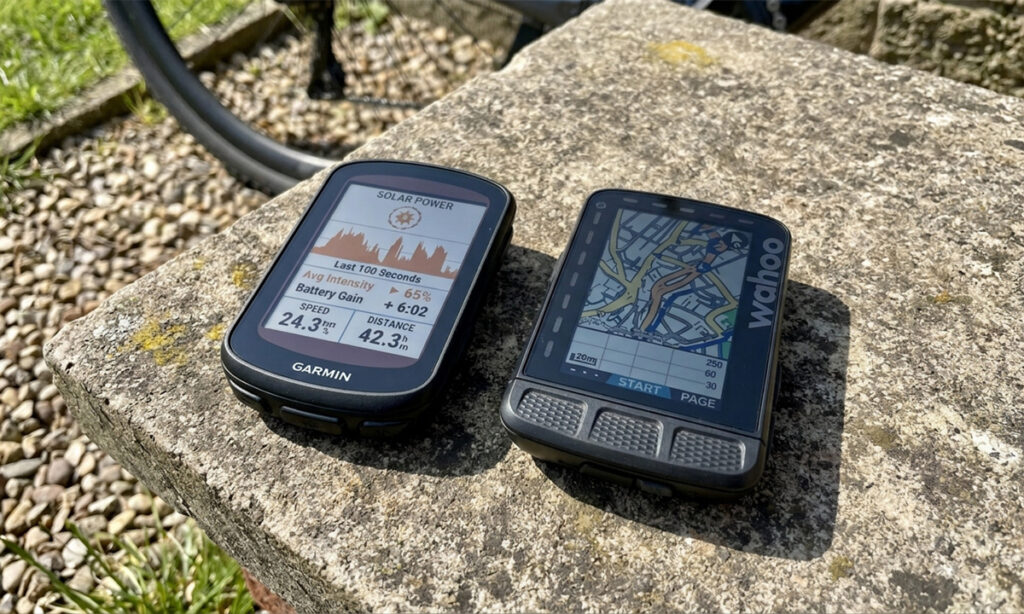
Here is the disclaimer first. This is a Wahoo vs Garmin bike computer comparison by brand, not by unit. I have the Wahoo ELEMNT ROAM v1, which I’ve used for about 3.5 years, mostly on road rides. My wife has a Garmin Edge 540 Solar, which is a lot newer. Pitting those two against each other wouldn’t be fair, so I’m focusing on what each brand is like to live with.
Both brands have also moved on since our units came out. Wahoo’s current lineup is the BOLT 3 and ROAM 3. Garmin’s is the Edge 550 and 850, which replaced the 540 and 840. I’ll flag where that matters. Here is how our Garmin Edge vs Wahoo ELEMNT household looks at a glance.
| Feature | My Wahoo ELEMNT ROAM v1 | Her Garmin Edge 540 Solar |
|---|---|---|
| Battery | About 400 km per charge, even after 3+ years (rated 17 hours) | Rated 26 hours, 32 with solar. She charges before it dies, so we haven’t tested it |
| Sunlight | Easy to read | Hard to see, in her words |
| Controls | Buttons | Buttons |
| Sync | Stopped syncing to Strava once, a reset fixed it | Rides sometimes don’t upload, re-pairing didn’t help |
| Extras | Workouts are easy to follow | Road hazards, plus a tight link to her watch, radar and HR strap |
Screens, buttons and rain
I don’t like touchscreens. If it starts raining, a wet screen and a wet glove are a bad combination, so I want buttons. My ROAM has them, and that’s a big reason I’ve been happy with it.
Here is what surprised me while I looked into this. Screen type isn’t really a brand thing. Wahoo’s newer ROAM 3 has a touchscreen, but the BOLT 3 is button only. Garmin’s Edge 540 and 550 are button only, and the 850 adds a touchscreen. So if buttons matter to you, both brands have an option.
Sunlight is where our opinions split. My Wahoo is easy to read in direct sun. My wife finds her Garmin hard to see in the same conditions. That is one screen against one screen, so I wouldn’t call it a rule. Still, Garmin’s own pitch for the newer Edge 550 and 850 is a brighter display that’s easier to read in the sun, so it’s clearly something riders care about.
Bike computer battery life and the solar question
Battery is where my Wahoo earns its keep. I get about 400 km (~16h) between charges, and that hasn’t dropped much after more than three years. Wahoo rates the ROAM v1 at 17 hours, so I’m getting close to the claim on an old unit.
On paper, Garmin wins this one. Garmin rates the Edge 540 Solar at up to 26 hours, or up to 32 with solar, under demanding use. I can’t confirm that from our house, because my wife never lets her unit die before charging. It has never really been tested. Her verdict is that the solar is a gimmick, since it only helps in direct sun.
Battery claims depend on screen brightness, sensors and navigation, so your numbers will differ. The better question is how often you’r
Apps, sensors and the ecosystem
This is where Garmin pulls ahead for my wife. She likes how the Garmin app ties together her watch, her Varia radar and her heart rate monitor. Everything lives in one place.
I use the Wahoo side much less. I only open the ELEMNT app to sync my rides to Strava, and that’s about it. Newer Wahoo units (the ROAM 3, BOLT 3 and ACE) have moved to the Wahoo app instead, and the ROAM 3 uses Wi-Fi for automatic uploads and updates. So my experience won’t match a new buyer’s on that front.
Mixing brands works better than you might expect. I use a Garmin heart rate monitor and a Garmin Varia, and both connect to my Wahoo without trouble. I do lose a few things. With the radar, for example, I can’t turn the radar off and leave only the light on. If you’re wondering whether a chest strap is worth it, we compared wrist and chest strap data in our wrist HR vs chest strap post, and our heart rate zones guide covers what to do with the numbers once you have them.
Wahoo also sells its own TRACKR RADAR light, and my ROAM v1 picked up support for it in a 2025 firmware update.
What Garmin does that Wahoo doesn’t
My wife’s favourite extra is road hazards. Riders can report potholes, debris and other trouble, and other Garmin users see the alerts on their screen. It works a bit like the hazard reports in Google Maps. Garmin lists the feature on the Edge 540, 840, 1040 and 1050. Wahoo doesn’t have a community-driven equivalent.
In practice, it’s only as useful as the number of Garmin riders on your roads. Even so, it’s a real safety feature, not a gimmick.
On the Wahoo side, I find workouts easy to follow on the ROAM. That sounds boring until you’re mid-interval and your brain has stopped working.
Sync problems and software updates
Sync
Neither brand gets a clean sheet here. My Wahoo stopped syncing with Strava for a while. A reset fixed it. My wife’s Garmin sometimes doesn’t upload rides to the Garmin app. She has paired and unpaired it several times, and a friend with a Garmin has the same problem. Two households don’t make a trend, but they’re enough to tell me that a bike computer is still a computer, and it will misbehave eventually.
Updates
I assumed Wahoo had stopped updating the ROAM v1. I was wrong. The release notes for the 2019 ROAM list firmware updates as recent as April 2026. When a GPS date bug hit older units in August 2025, Wahoo shipped a fix for them too. That’s decent support for a device this old.
Elevation numbers that don’t match
After every ride, my Wahoo shows noticeably less elevation than my Garmin watch. I record on both, so I see it a lot. Before you blame the brand, know that most bike computers and watches estimate climbing from air pressure, and weather, wind and wet roads add noise. Strava and Garmin Connect can also recalculate elevation from map data, which changes the totals again. I haven’t figured out which number is closer to the truth. I’m not sure either one is.
Best bike computer for beginners: Wahoo or Garmin?
For most beginners, I’d lean Wahoo if you want something simple, with long battery life and buttons, and you don’t mind skipping the extras. I’d lean Garmin if you already own a Garmin watch, radar or heart rate strap, or if features like road hazards and a richer app appeal to you. That isn’t a ruling. It’s a starting point.
I should be upfront about my bias. I’m a Wahoo owner surrounded by Garmin accessories, so I lean one way while being outnumbered the other.
Whichever you pick, buy the model, not the brand. A button-only unit and a touchscreen unit feel very different, and both brands sell both. Prices also move around. At launch in the US, the BOLT 3 was about US$330 and the ROAM 3 about US$450, while the Edge 550 was about US$500 and the Edge 850 about US$600. Check current prices before you buy. If you’re still working out what else belongs on a road bike, our bang for buck road bike upgrades post is a good next stop, and a computer makes a solid present too, as we covered in our gifts for beginner cyclists list.
Planning a long ride with your new computer?
Whichever brand you pick, you still have to eat. Our Fuel Calculator works out how many carbs per hour to bring, so the battery isn’t the only thing that lasts.
Common questions
Can I use a Garmin watch as a backup while riding with a Wahoo?
Yes. I record on my Garmin watch alongside my Wahoo. If either battery dies, I still have a recording. I only upload one file to Strava, usually the Wahoo one, so I don’t end up with a double ride on my profile.
Do I need a phone to set up a Wahoo or Garmin?
In practice, yes. Garmin works through the Garmin Connect app. Wahoo’s newer units use the Wahoo app, while older ones like my ROAM v1 still use the ELEMNT app. The ROAM 3 also needs a Wi-Fi connection for automatic uploads and firmware updates, which Wahoo explains on its ROAM 3 support page.
Do I need a bike computer if I already have a watch?
Not strictly. A watch can record the ride, and I use mine as a backup. A computer gives you a bigger screen on the handlebars, easier glances mid-ride and, in my case, a battery that lasts about 400 km. For most people who ride outdoors regularly, it’s worth having.